The physical structure of records in InnoDB

In On learning InnoDB: A journey to the core, I introduced the innodb_diagrams project to document the InnoDB internals, which provides the diagrams used in this post. Later on in A quick introduction to innodb_ruby I walked through installation and a few quick demos of the innodb_space command-line tool.

The physical structure of InnoDB’s INDEX pages was described in The physical structure of InnoDB index pages, and the logical structure was described in B+Tree index structures in InnoDB. Now we’ll look in detail at the physical structure of records used in those pages.

In this post, only COMPACT row format (for Barracuda table format) is considered.

Record offsets

In previous posts, record offsets have been described in many structures that need to “point” to records. Record offsets point to the start of the record data itself, which is variable-length, but each record is preceded by a record header, which is also variable-length. In this post and the illustrations in it, I use N to mean the start of the record, where the record data is at N and using positive offsets (e.g. N+1), and the record header uses negative offsets (e.g. N-1). InnoDB often refers to the start of the record data, location N as the “origin”.

The record header

In previous posts, the record header was mentioned a few times, but hasn’t been fully described. As above, the record header precedes the record itself, and is structured as follows:
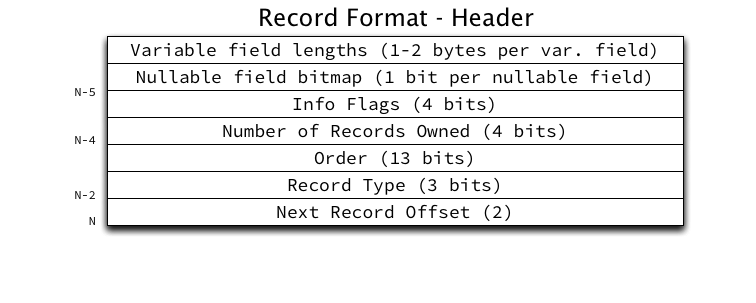
The fields in the record header are (in order, backwards from N):

  1. Next Record Offset: A relative offset from the current record to the origin of the next record within the page in ascending order by key.
  2. Record Type: The type of the record, where currently only 4 values are supported: conventional (0), node pointer (1), infimum (2), and supremum (3).
  3. Order: The order in which this record was inserted into the heap. Heap records (which include infimum and supremum) are numbered from 0. Infimum is always order 0, supremum is always order 1. User records inserted will be numbered from 2.
  4. Number of Records Owned: The number of records “owned” by the current record in the page directory. This field will be further discussed in a future post about the page directory.
  5. Info Flags: A 4-bit bitmap to store boolean flags about this record. Currently only two flags are defined: min_rec (1) meaning this record is the minimum record in a non-leaf level of the B+Tree, and deleted (2) meaning the record is delete-marked (and will be actually deleted by a purge operation in the future).
  6. Nullable field bitmap (optional): A single bit per nullable field to store whether the field is NULL, rounded up to a whole number of bytes. If a field is NULL its field value will be eliminated from the key or row portion of the record. If no fields are nullable, this bitmap is absent.
  7. Variable field lengths array (optional): An array of 8-bit or 16-bit integers (depending on the maximum size of the field) per variable-length field to store the length of the field data for that field. If no fields are variable-length, this array is absent.

The record header is a minimum of 5 bytes per row, but for records with many variable-width fields, it could be a lot larger.

Clustered indexes

The clustered key (PRIMARY KEY) has one of the more complex record structures:
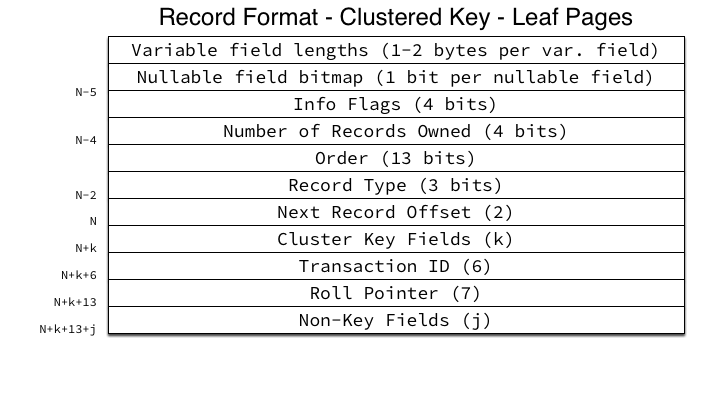
The following fields are included in the record data:

  1. Cluster Key Fields: The cluster key fields, concatenated together (literally). InnoDB just concatenates the raw bytes of its internal storage formats per column type together into a single byte stream.
  2. Transaction ID: The 48-bit integer transaction ID of the transaction which last modified this record.
  3. Roll Pointer: A structure containing information about the location in the rollback segment of the undo records for the transaction which last modified this record. The fields of the roll pointer structure are: 1-bit “is insert” flag, 7-bit rollback segment ID, 4-byte page number and 2-byte page offset of the undo log location.
  4. Non-Key Fields: All non-key fields (the actual row data for all non-PRIMARY KEY fields) concatenated together into a single byte stream.

The structure of non-leaf page records is similar, but somewhat simpler:

Since non-leaf pages are not MVCC, the Transaction ID and Roll Pointer fields are eliminated. Instead of the non-key fields, the child page number this node pointer points to is included. Since the cluster key cannot be NULL, the nullable field bitmap is absent.

Secondary indexes

Secondary indexes in InnoDB have an identical overall structure to the clustered key (PRIMARY KEY) but instead of containing non-key fields, they contain the clustered key fields, also known as a Primary Key Value or most commonly, PKV. If any fields overlap between the secondary key and the clustered key, the overlapping fields are removed from the clustered key stored in the secondary index records. For example, if a table has a PRIMARY KEY (a, b, c) and a secondary index KEY (a, d), the secondary key in the index will be as expected, (a, d) but the PKVs will contain only (b, c).

Since secondary keys are allowed to include fields that are both non-unique and nullable, both the variable field lengths array and the nullable field bitmap may be present if necessary. Otherwise the leaf page structure is very simple:
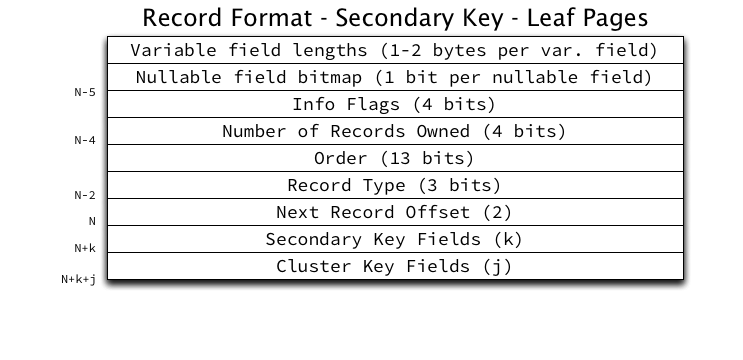
The secondary key fields are concatenated together into a single byte stream as with the clustered key. The clustered key fields are concatenated together in exactly the same way to form the PKV.

The secondary index non-leaf pages will also look familiar:
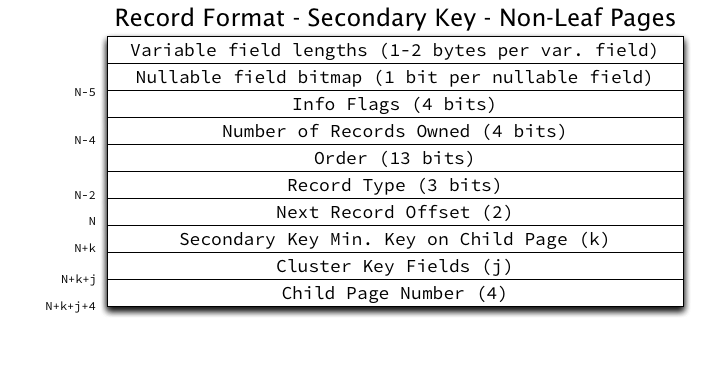
There is one thing of note for secondary index non-leaf pages: the clustered key fields (PKV) are included in the record and is considered part of the record’s key, not its value. Secondary indexes may be non-unique, but each record in the page must have a unique identifier, so the PKV must be included in the record to ensure uniqueness. This will mean that records in non-leaf pages of secondary keys will be 4 bytes larger than their leaf page counterparts.

An aside on per-row overhead

Looking at the above illustrations, you can easily calculate the per-row overhead InnoDB requires. Clustered Key Leaf Pages require a minimum of 5 bytes for the header, 6 bytes for the Transaction ID, and 7 bytes for the Roll Pointer, totaling 18 bytes per row. For very narrow tables (for example 2-3 integers) this overhead can be quite high.

In addition, there is substantial per-page overhead, and waste in inefficiently filling pages which can consume large amounts of space (for instance pages may be half-filled).

What’s next?

In the next post I will describe the page directory and its purpose in efficient record retrieval.

Update: I had incorrectly stated that the nullable field bitmap would not be present on clustered key leaf pages, but it is in fact present if any non-key fields are nullable. It is always absent on clustered key non-leaf pages because the clustered key must be NOT NULL.

B+Tree index structures in InnoDB

[This post refers to innodb_ruby version 0.8.8 as of February 3, 2014.]

In On learning InnoDB: A journey to the core, I introduced the innodb_diagrams project to document the InnoDB internals, which provides the diagrams used in this post. Later on in A quick introduction to innodb_ruby I walked through installation and a few quick demos of the innodb_space command-line tool.

The physical structure of InnoDB’s INDEX pages was described in The physical structure of InnoDB index pages. We’ll now look into how InnoDB logically structures its indexes, using some practical examples.

An aside on terminology: B+Tree, root, leaf, and level

InnoDB uses a B+Tree structure for its indexes. A B+Tree is particularly efficient when data doesn’t fit in memory and must be read from the disk, as it ensures that a fixed maximum number of reads would be required to access any data requested, based only on the depth of the tree, which scales nicely.

An index tree starts at a “root” page, whose location is fixed (and permanently stored in the InnoDB’s data dictionary) as a starting point for accessing the tree. The tree may be as small as the single root page, or as large as many millions of pages in a multi-level tree.

Pages are referred to as being “leaf” pages or “non-leaf” pages (also called “internal” or “node” pages in some contexts). Leaf pages contain actual row data. Non-leaf pages contain only pointers to other non-leaf pages, or to leaf pages. The tree is balanced, so all branches of the tree have the same depth.

InnoDB assigns each page in the tree a “level”: leaf pages are assigned level 0, and the level increments going up the tree. The root page level is based on the depth of the tree. All pages that are neither leaf pages nor the root page can also be called “internal” pages, if a distinction is important.

Leaf and non-leaf pages

For both leaf and non-leaf pages, each record (including the infimum and supremum system records) contain a “next record” pointer, which stores an offset (within the page) to the next record. The linked list starts at infimum and links all records in ascending order by key, terminating at supremum. The records are not physically ordered within the page (they take whatever space is available at the time of insertion); their only order comes from their position in the linked list.

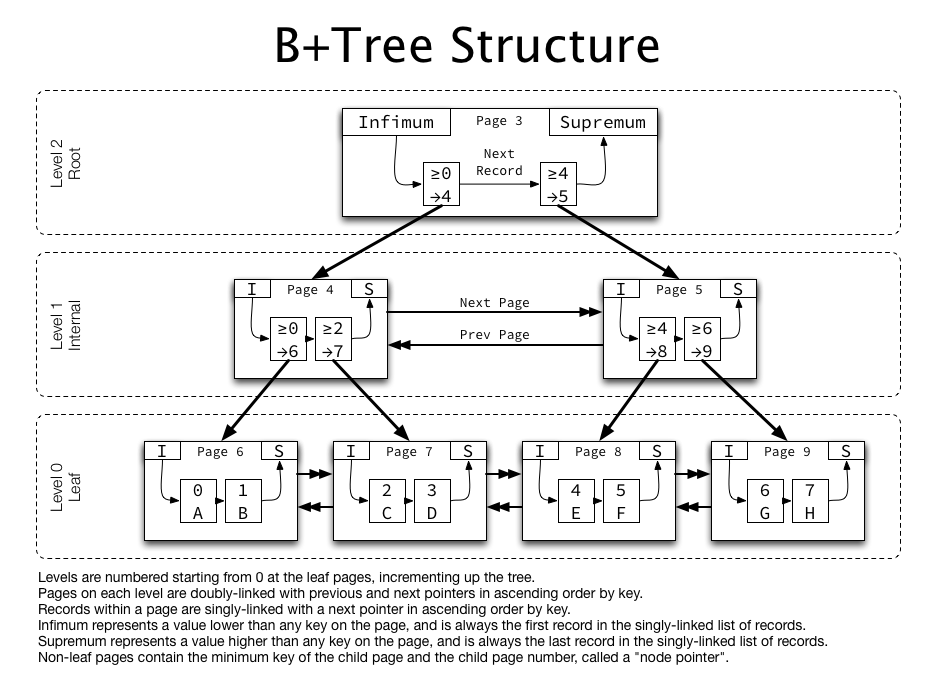
Leaf pages contain the non-key values as part of the “data” contained in each record:

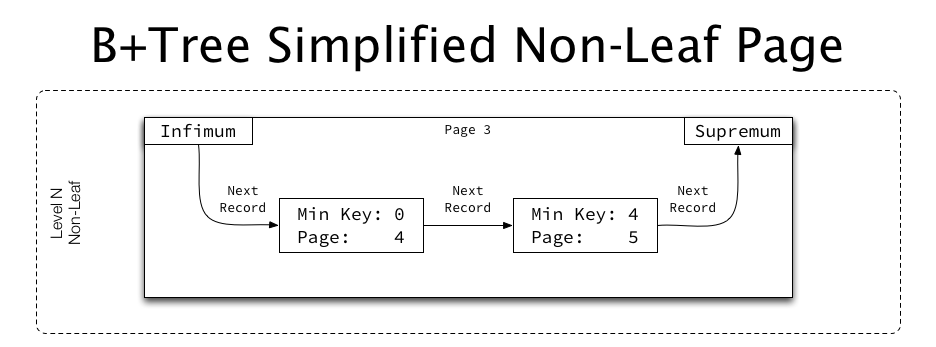
Non-leaf pages have an identical structure, but instead of non-key fields, their “data” is the page number of the child page, and instead of an exact key, they represent the minimum key on the child page they point to:

Pages at the same level

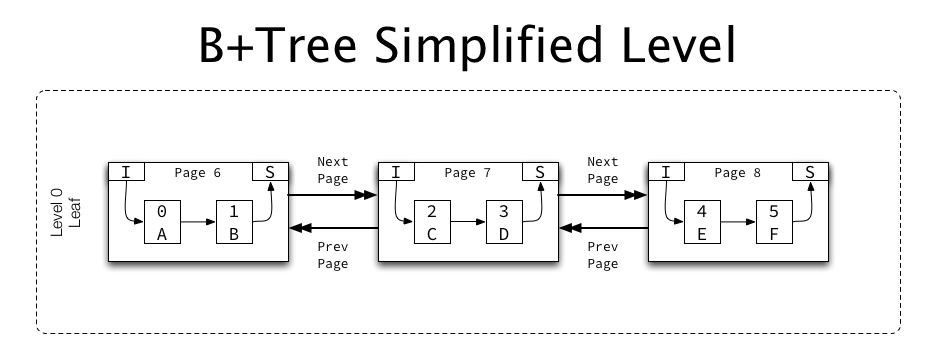
Most indexes contain more than one page, so multiple pages are linked together in ascending and descending order:

Each page contains pointers (in the FIL header) for “previous page” and “next page”, which for INDEX pages are used to form a doubly-linked list of pages at the same level (e.g. leaf pages, at level 0 form one list, level 1 pages form a separate list, etc.).

A detailed look at a single-page table

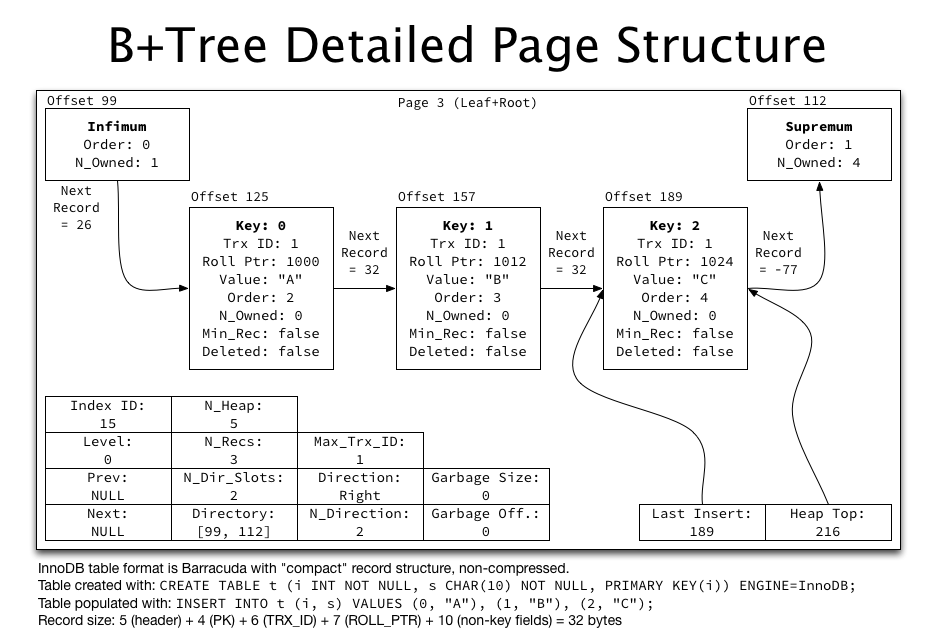
Let’s take a look at most of what’s B+Tree related in a single index page:

Create and populate the table

The test table in use in the illustration above can be created and populated with (make sure you’re using innodb_file_per_table and using Barracuda file format):

CREATE TABLE t_btree (
  i INT NOT NULL,
  s CHAR(10) NOT NULL,
  PRIMARY KEY(i)
) ENGINE=InnoDB;

INSERT INTO t_btree (i, s)
  VALUES (0, "A"), (1, "B"), (2, "C");

While this table is quite small and not realistic, it does demonstrate nicely how records and record traversal works.

Verify the basic structure of the space file

The table should match what we’ve examined before, with the three standard overhead pages (FSP_HDR, IBUF_BITMAP, and INODE) followed by a single INDEX page for the root of the index, and in this case two unused ALLOCATED pages.

$ innodb_space -f t_btree.ibd space-page-type-regions
start       end         count       type                
0           0           1           FSP_HDR             
1           1           1           IBUF_BITMAP         
2           2           1           INODE               
3           3           1           INDEX               
4           5           2           FREE (ALLOCATED)    

The space-index-pages-summary mode will give us a count of records in each page, and is showing the expected 3 records:

$ innodb_space -f t_btree.ibd space-index-pages-summary
page        index   level   data    free    records 
3           18      0       96      16156   3       
4           0       0       0       16384   0       
5           0       0       0       16384   0       

(Note that space-index-pages-summary also shows the empty ALLOCATED pages as empty pages with zero records, since that’s often what you’re interested in for plotting purposes.)

The space-indexes mode will show the stats about our PRIMARY KEY index, which is consuming a single page on its internal file segment:

$ innodb_space -f t_btree.ibd space-indexes
id          root        fseg        used        allocated   fill_factor 
18          3           internal    1           1           100.00%     
18          3           leaf        0           0           0.00%       

Set up a record describer

In order for innodb_ruby to parse the contents of records, we need to provide a record describer, which is just a Ruby class providing a method that returns a description of an index:

class SimpleTBTreeDescriber < Innodb::RecordDescriber
  type :clustered
  key "i", :INT, :NOT_NULL
  row "s", "CHAR(10)", :NOT_NULL
end

We need to note that this is the clustered key, provide the column descriptions for the key, and the column descriptions for the non-key (“row”) fields. It’s necessary to ask innodb_space to load this class with the following additional arguments:

-r -r ./simple_t_btree_describer.rb -d SimpleTBTreeDescriber

Look at the record contents

The root page (which is a leaf page) in this example can be dumped using the page-dump mode and providing the page number for the root page:

$ innodb_space -f t_btree.ibd -r ./simple_t_btree_describer.rb -d SimpleTBTreeDescriber -p 3 page-dump

Aside from some parts of this output we’ve looked at before, it will now print a “records:” section with the following structure per record:

{:format=>:compact,
 :offset=>125,
 :header=>
  {:next=>157,
   :type=>:conventional,
   :heap_number=>2,
   :n_owned=>0,
   :min_rec=>false,
   :deleted=>false,
   :field_nulls=>nil,
   :field_lengths=>[0, 0, 0, 0],
   :field_externs=>[false, false, false, false]},
 :next=>157,
 :type=>:clustered,
 :key=>[{:name=>"i", :type=>"INT", :value=>0, :extern=>nil}],
 :transaction_id=>"0000000f4745",
 :roll_pointer=>
  {:is_insert=>true, :rseg_id=>8, :undo_log=>{:page=>312, :offset=>272}},
 :row=>[{:name=>"s", :type=>"CHAR(10)", :value=>"A", :extern=>nil}]}

This should align with the above detailed illustration perfectly, as I’ve copied most of the information from this example for accuracy. Note the following aspects:

  • The :format being :compact indicates that the record is the new “compact” format in Barracuda format tables (as opposed to “redundant” in Antelope tables).
  • The :key listed in the output is an array of key fields for the index, and :row is an array of non-key fields.
  • The :transaction_id and :roll_pointer fields are internal fields for MVCC included in each record, since this is a clustered key (the PRIMARY KEY).
  • The :next field within the :header hash is a relative offset (32) which must be added to the current record offset (125) to yield the actual offset of the next record (157). For convenience this calculated offset is included as :next in the record hash.

Recurse the index

A nice and simple output of recursing the entire index can be achieved with the index-recurse mode, but since this is still a single-page index, the output will be very short:

$ innodb_space -f t_btree.ibd -r ./simple_t_btree_describer.rb -d SimpleTBTreeDescriber -p 3 index-recurse
ROOT NODE #3: 3 records, 96 bytes
  RECORD: (i=0) -> (s=A)
  RECORD: (i=1) -> (s=B)
  RECORD: (i=2) -> (s=C)

Building a non-trivial index tree

A multi-level index tree (overly simplified) in InnoDB looks like:

As previously described, all pages at each level are doubly-linked to each other, and within each page, records are singly-linked in ascending order. Non-leaf pages contain “pointers” (containing the child page number) rather than non-key row data.

If we use the simpler table schema with 1 million rows created in A quick introduction to innodb_ruby, the tree structure looks a little more interesting:

$ innodb_space -f t.ibd -r ./simple_t_describer.rb -d SimpleTDescriber -p 3 index-recurse

ROOT NODE #3: 2 records, 26 bytes
  NODE POINTER RECORD >= (i=252) -> #36
  INTERNAL NODE #36: 1117 records, 14521 bytes
    NODE POINTER RECORD >= (i=252) -> #4
    LEAF NODE #4: 446 records, 9812 bytes
      RECORD: (i=1) -> ()
      RECORD: (i=2) -> ()
      RECORD: (i=3) -> ()
      RECORD: (i=4) -> ()

<many lines omitted>

    NODE POINTER RECORD >= (i=447) -> #1676
    LEAF NODE #1676: 444 records, 9768 bytes
      RECORD: (i=447) -> ()
      RECORD: (i=448) -> ()
      RECORD: (i=449) -> ()
      RECORD: (i=450) -> ()

<many lines omitted>

    NODE POINTER RECORD >= (i=891) -> #771
    LEAF NODE #771: 512 records, 11264 bytes
      RECORD: (i=891) -> ()
      RECORD: (i=892) -> ()
      RECORD: (i=893) -> ()
      RECORD: (i=894) -> ()

This is a three-level index tree, which can be seen by the ROOT, INTERNAL, LEAF lines above. We can see that some pages are completely full, with 468 records consuming almost 15 KiB of the 16 KiB page.

Looking at a non-leaf page (page 36, in the above output) using the page-dump mode, records look slightly different than the leaf pages shown previously:

$ innodb_space -f t.ibd -r ./simple_t_describer.rb -d SimpleTDescriber -p 36 page-dump

{:format=>:compact,
 :offset=>125,
 :header=>
  {:next=>11877,
   :type=>:node_pointer,
   :heap_number=>2,
   :n_owned=>0,
   :min_rec=>true,
   :deleted=>false,
   :field_nulls=>nil,
   :field_lengths=>[0],
   :field_externs=>[false]},
 :next=>11877,
 :type=>:clustered,
 :key=>[{:name=>"i", :type=>"INT UNSIGNED", :value=>252, :extern=>nil}],
 :child_page_number=>4}

The :key array is present, although it represents the minimum key rather than an exact key, and no :row is present, as a :child_page_number takes its place.

The root page is a bit special

Since the root page is allocated when the index is first created, and that page number is stored in the data dictionary, the root page can never relocated or removed. Once the root page fills up, it will need to be split, forming a small tree of a root page plus two leaf pages.

However, the root page itself can’t actually be split, since it cannot be relocated. Instead, a new, empty page is allocated, the records in the root are moved there (the root is “raised” a level), and that new page is split into two. The root page then does not need to be split again until the level immediately below it has enough pages that the root becomes full of child page pointers (called “node pointers”), which in practice often means several hundred to more than a thousand.

B+Tree levels and increasing tree depth

As an example of the efficiency of B+Tree indexes, assume perfect record packing (every page full, which will never quite happen in practice, but is useful for discussion). A B+Tree index in InnoDB for the simple table in the examples above will be able to store 468 records per leaf page, or 1203 records per non-leaf page. The index tree can then be a maximum of the following sizes at the given tree heights:

Height Non-leaf pages Leaf pages Rows Size in bytes
1 0 1 468 16.0 KiB
2 1 1203 > 563 thousand 18.8 MiB
3 1204 1447209 > 677 million 22.1 GiB
4 1448413 1740992427 > 814 billion 25.9 TiB

As you can imagine, most tables with sensible PRIMARY KEY definitions are 2-3 levels, with some achieving 4 levels. Using an excessively large PRIMARY KEY can cause the B+Tree to be much less efficient, however, since primary key values must be stored in the non-leaf pages. This can drastically inflate the size of the records in non-leaf pages, meaning many fewer of those records fit in each non-leaf page, making the whole structure less efficient.

What’s next?

Next we’ll take a look at the page directory structure in INDEX pages which mentioned several times already, and then look at how to search efficiently within InnoDB indexes.

The physical structure of InnoDB index pages

In On learning InnoDB: A journey to the core, I introduced the innodb_diagrams project to document the InnoDB internals, which provides the diagrams used in this post. (Note that each image below is linked to a higher resolution version of the same image.)

The basic structure of the space and each page was described in The basics of InnoDB space file layout, and we’ll now take a deeper look into how INDEX pages are physically structured. This will lay the ground work to discuss indexes at a logical (and much higher) level.

Everything is an index in InnoDB

Before diving into physical structures, it’s critical to understand that in InnoDB, everything is an index. What does that mean to the physical structure?

  1. Every table has a primary key; if the CREATE TABLE does not specify one, the first non-NULL unique key is used, and failing that, a 48-bit hidden “Row ID” field is automatically added to the table structure and used as the primary key. Always add a primary key yourself. The hidden one is useless to you but still costs 6 bytes per row.
  2. The “row data” (non-PRIMARY KEY fields) are stored in the PRIMARY KEY index structure, which is also called the “clustered key”. This index structure is keyed on the PRIMARY KEY fields, and the row data is the value attached to that key (as well as some extra fields for MVCC).
  3. Secondary keys are stored in an identical index structure, but they are keyed on the KEY fields, and the primary key value (PKV) is attached to that key.

When discussing “indexes” in InnoDB (as in this post), this actually means both tables and indexes as the DBA may think of them.

Overview of INDEX page structure

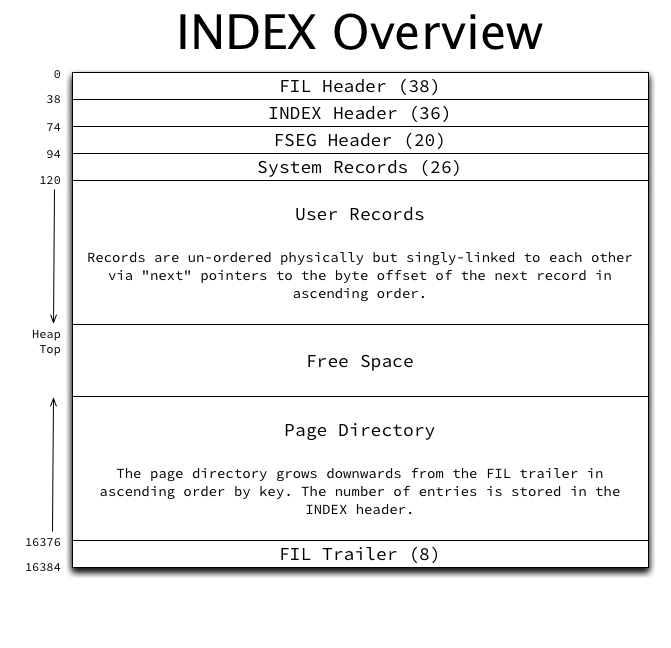
Every index page has an overall structure as follows:

The major sections of the page structure are (not in order):

  • The FIL header and trailer: This is typical and common to all page types. One aspect somewhat unique to INDEX pages is that the “previous page” and “next page” pointers in the FIL header point to the previous and next pages at the same level of the index, and in ascending order based on the index’s key. This forms a doubly-linked list of all pages at each level. This will be further described in the logical index structure.
  • The FSEG header: As described in Page management in InnoDB space files, the index root page’s FSEG header contains pointers to the file segments used by this index. All other index pages’ FSEG headers are unused and zero-filled.
  • The INDEX header: Contains many fields related to INDEX pages and record management. Fully described below.
  • System records: InnoDB has two system records in each page called infimum and supremum. These records are stored in a fixed location in the page so that they can always be found directly based on byte offset in the page.
  • User records: The actual data. Every record has a variable-width header and the actual column data itself. The header contains a “next record” pointer which stores the offset to the next record within the page in ascending order, forming a singly-linked list. Details of user record structure will be described in a future post.
  • The page directory: The page directory grows downwards from the “top” of the page starting at the FIL trailer and contains pointers to some of the records in the page (every 4th to 8th record). Details of the page directory logical structure and its purpose will be described in a future post.

The INDEX header

The INDEX header in each INDEX page is fixed-width and has the following structure:

The fields stored in this structure are (not in order):

  • Index ID: The ID of the index this page belongs to.
  • Format Flag: The format of the records in this page, stored in the high bit (0x8000) of the “Number of Heap Records” field. Two values are possible: COMPACT and REDUNDANT. Described fully below.
  • Maximum Transaction ID: The maximum transaction ID of any modification to any record in this page.
  • Number of Heap Records: The total number of records in the page, including the infimum and supremum system records, and garbage (deleted) records.
  • Number of Records: The number of non-deleted user records in the page.
  • Heap Top Position: The byte offset of the “end” of the currently used space. All space between the heap top and the end of the page directory is free space.
  • First Garbage Record Offset: A pointer to the first entry in the list of garbage (deleted) records. The list is singly-linked together using the “next record” pointers in each record header. (This is called “free” within InnoDB, but this name is somewhat confusing.)
  • Garbage Space: The total number of bytes consumed by the deleted records in the garbage record list.
  • Last Insert Position: The byte offset of the record that was last inserted into the page.
  • Page Direction: Three values are currently used for page direction: LEFT, RIGHT, and NO_DIRECTION. This is an indication as to whether this page is experiencing sequential inserts (to the left [lower values] or right [higher values]) or random inserts. At each insert, the record at the last insert position is read and its key is compared to the currently inserted record’s key, in order to determine insert direction.
  • Number of Inserts in Page Direction: Once the page direction is set, any following inserts that don’t reset the direction (due to their direction differing) will instead increment this value.
  • Number of Directory Slots: The size of the page directory in “slots”, which are each 16-bit byte offsets.
  • Page Level: The level of this page in the index. Leaf pages are at level 0, and the level increments up the B+tree from there. In a typical 3-level B+tree, the root will be level 2, some number of internal non-leaf pages will be level 1, and leaf pages will be level 0. This will be discussed in more detail in a future post as it relates to logical structure.

Record format: redundant versus compact

The COMPACT record format is new in the Barracuda table format, while the REDUNDANT record format is the original one in the Antelope table format (neither of which had a name officially until Barracuda was created). The COMPACT format mostly eliminated information that was redundantly stored in each record and can be obtained from the data dictionary, such as the number of fields, which fields are nullable, and which fields are dynamic length.

An aside on record pointers

Record pointers are used in several different places: the Last Insert Position field in the INDEX header, all values in the page directory, and the “next record” pointers in the system records and user records. All records contain a header (which may be variable-width) followed by the actual record data (which may also be variable-width). Record pointers point to the location of the first byte of record data, which is effectively “between” the header and the record data. This allows the header to be read by reading backwards from that location, and the record data to be read forward from that location.

Since the “next record” pointer in system and user records is always the first field in the header reading backwards from this pointer, this means it is also possible to very efficiently read through all records in a page without having to parse the variable-width record data at all.

System records: infimum and supremum

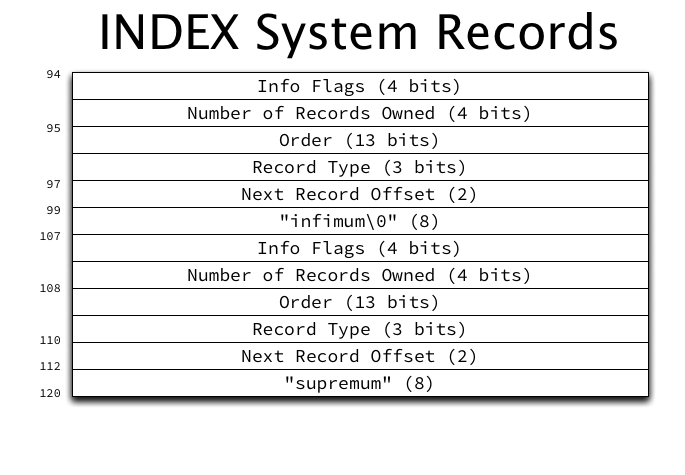
Every INDEX page contains two system records, called infimum and supremum, at fixed locations (offset 99 and offset 112 respectively) within the page, with the following structure:

The two system records have a typical record header preceding their location, and the literal strings “infimum” and “supremum” as their only data. A full description of record header fields will be provided in a future post. For now, it is important primarily to observe that the first field (working backwards from the record data, as previously described) is the “next record” pointer.

The infimum record

The infimum record represents a value lower than any possible key in the page. Its “next record” pointer points to the user record with the lowest key in the page. Infimum serves as a fixed entry point for sequentially scanning user records.

The supremum record

The supremum record represents a key higher than any possible key in the page. Its “next record” pointer is always zero (which represents NULL, and is always an invalid position for an actual record, due to the page headers). The “next record” pointer of the user record with the highest key on the page always points to supremum.

User records

The actual on-disk format of user records will be described in a future post, as it is fairly complex and will require a lengthy explanation itself.

User records are added to the page body in the order they are inserted (and may take existing free space from previously deleted records), and are singly-linked in ascending order by key using the “next record” pointers in each record header. A singly-linked list is formed from infimum, through all user records in ascending order, and terminating at supremum. Using this list, it is trivial to scan in through all user records in a page in ascending order.

Further, using the “next page” pointer in the FIL header, it’s easy to scan from page to page through the entire index in ascending order. This means an ascending-order table scan is also trivial to implement:

  1. Start at the first (lowest key) page in the index. (This page is found through B+tree traversal, which will be described in a future post.)
  2. Read infimum, and follow its “next record” pointer.
  3. If the record is supremum, proceed to step 5. If not, read and process the record contents.
  4. Follow the “next record” pointer and return to step 3.
  5. If the “next page” pointer points to NULL, exit. If not, follow the “next page” pointer and return to step 2.

Since records are singly-linked rather than doubly-linked, traversing the index in descending order is not as trivial, and will be discussed in a future post.

The page directory

The page directory starts at the FIL trailer and grows “downwards” from there towards the user records. The page directory contains a pointer to every 4-8 records, in addition to always containing an entry for infimum and supremum.

The page directory is simply a dynamically-sized array of 16-bit offset pointers to records within the page. Its purpose will be more fully described in a future post dedicated to the page directory.

Free space

The space between the user records (which grow “upwards”) and the page directory (which grows “downwards”) is considered free space. Once the two sections meet in the middle, exhausting the free space (and assuming no space can be reclaimed by re-organizing to remove the garbage) the page is considered full.

What’s next?

Next we’ll look at the logical structure of an index, including some examples.

Exploring InnoDB page management with innodb_ruby

[This post refers to innodb_ruby version 0.8.8 as of February 3, 2014.]

In On learning InnoDB: A journey to the core I introduced a new library and command-line tool in the innodb_ruby project. Later on in A quick introduction to innodb_ruby I walked through installation and a few quick demos of the innodb_space command-line tool.

In my last post, Page management in InnoDB space files, I described InnoDB’s extent, file segment, and free space management structures. Now I will provide a few demonstrations of using innodb_space to examine those structures in real tables.

A minimal, empty table

I created an empty table (the schema doesn’t matter) to illustrate the “minimal” state of InnoDB’s page management structures. The space-page-type-regions mode will summarize the type of all contiguous regions of the same page type:

$ innodb_space -f test/e.ibd space-page-type-regions
start       end         count       type                
0           0           1           FSP_HDR             
1           1           1           IBUF_BITMAP         
2           2           1           INODE               
3           3           1           INDEX               
4           5           2           FREE (ALLOCATED)    

The table has allocated the standard pages for IBD space files: FSP_HDR, IBUF_BITMAP, INODE, and an INDEX page for the root of the (empty) index. There are also two FREE (ALLOCATED) pages which are unused.

The space-lists mode can be used to summarize the extent descriptor and inode lists in the space:

$ innodb_space -f test/e.ibd space-lists
name                length      f_page      f_offset    l_page      l_offset    
free                0           0           0           0           0           
free_frag           1           0           158         0           158         
full_frag           0           0           0           0           0           
full_inodes         0           0           0           0           0           
free_inodes         1           2           38          2           38          

Only the free_frag extent descriptor list has any entries, and only a single extent is in it. The free_inodes list has the one INODE page seen above in it.

The contents of the free_frag list can be examined with the space-list-iterate mode, which will print a graphic illustrating the usage of pages within all extents in an extent list (“#” means the page is used, “.” means the page is free):

$ innodb_space -f test/e.ibd -L free_frag space-list-iterate
start_page  page_used_bitmap                                                
0           ####............................................................

The file segments in all indexes in the space can be summarized with the space-indexes mode:

$ innodb_space -f test/e.ibd space-indexes
id          root        fseg        used        allocated   fill_factor 
16          3           internal    1           1           100.00%     
16          3           leaf        0           0           0.00%       

Only the internal file segment has any pages allocated, and it only has a single page allocated. The index-fseg-internal-lists mode will summarize the extent lists in the internal file segment:

$ innodb_space -f test/e.ibd -p 3 index-fseg-internal-lists
name                length      f_page      f_offset    l_page      l_offset    
free                0           0           0           0           0           
not_full            0           0           0           0           0           
full                0           0           0           0           0           

All three lists are empty, because this empty table has not allocated any full extents. So where did the 1 page that is used go? It’s a “fragment” page, and those can be listed with the index-fseg-internal-frag-pages mode:

$ innodb_space -f test/e.ibd -p 3 index-fseg-internal-frag-pages
page        index   level   data    free    records 
3           16      0       0       16252   0       

That’s the minimal state of things — mostly empty bookkeeping structures, and a single INDEX page. Let’s take a look at a table with some real data in it.

A table with one million rows

In A quick introduction to innodb_ruby, I created a table with 1 million rows in it. We’ll use the same table in the examples here.

There are a total of 2,165 pages, with the majority of them type INDEX as a typical table would be:

$ innodb_space -f test/t.ibd space-page-type-regions
start       end         count       type                
3           37          35          INDEX               
38          63          26          FREE (ALLOCATED)    
64          2188        2125        INDEX               
2189        2239        51          FREE (ALLOCATED)    
2240        2240        1           INDEX               
2241        2303        63          FREE (ALLOCATED)    
2304        2304        1           INDEX               
2305        2367        63          FREE (ALLOCATED)    
2368        2368        1           INDEX               
2369        2431        63          FREE (ALLOCATED)    
2432        2432        1           INDEX               
2433        2495        63          FREE (ALLOCATED)    
2496        2496        1           INDEX               
2497        2687        191         FREE (ALLOCATED)    

Note that there are a few gaps of ALLOCATED (free) pages in between blocks of INDEX pages. InnoDB does not guarantee that it uses free pages sequentially, and many optimizations around bulk data loading will cause pages to be used out of order. (More on page splitting and these optimizations in a future post.)

Looking at the space’s lists, there are actually a few extents in free, as well as the usual one extent in free_frag:

$ innodb_space -f test/t.ibd space-lists
name                length      f_page      f_offset    l_page      l_offset    
free                2           0           1758        0           1798        
free_frag           1           0           158         0           158         
full_frag           0           0           0           0           0           
full_inodes         0           0           0           0           0           
free_inodes         1           2           38          2           38          

The pages in the free extent descriptor list are all free, as expected:

$ innodb_space -f test/t.ibd -L free space-list-iterate
2560        ................................................................
2624        ................................................................

The free_frag extent descriptor list shows a number of “fragment” pages are used as well:

$ innodb_space -f test/t.ibd -L free_frag space-list-iterate
start_page  page_used_bitmap                                                
0           ######################################..........................

The index file segments show the bulk of the used pages are allocated to the leaf file segment, also as expected (there are only 3 non-leaf internal pages to manage the 2,137 leaf pages in the B+tree):

$ innodb_space -f test/t.ibd space-indexes
id          root        fseg        used        allocated   fill_factor 
15          3           internal    3           3           100.00%     
15          3           leaf        2162        2528        85.52%      

You can also see that the leaf index file segment has more pages allocated than it’s actually using, showing an 85.52% fill factor. This is due to InnoDB’s “segment fill factor” which is fixed at 87.5% in stock MySQL, but is now configurable in Twitter MySQL thanks to a heads up from Facebook filing MySQL Bug 64673.

Since the internal index file segment has only three pages, as expected the file segment lists are all empty:

$ innodb_space -f test/t.ibd -p 3 index-fseg-internal-lists
name                length      f_page      f_offset    l_page      l_offset    
free                0           0           0           0           0           
not_full            0           0           0           0           0           
full                0           0           0           0           0           

The three used pages are allocated as fragment pages:

$ innodb_space -f test/t.ibd -p 3 index-fseg-internal-frag-pages
page        index   level   data    free    records 
3           15      2       26      16226   2       
36          15      1       14521   1401    1117    
37          15      1       13585   2341    1045    

The leaf index file segment lists are pretty busy, with 32 full extents and 6 not full extents:

$ innodb_space -f test/t.ibd -p 3 index-fseg-leaf-lists
name                length      f_page      f_offset    l_page      l_offset    
free                0           0           0           0           0           
not_full            6           0           1518        0           1718        
full                33          0           198         0           1478        

In addition the leaf index file segment has allocated all 32 fragment pages possible (before any of the full extents above):

$ innodb_space -f test/t.ibd -p 3 index-fseg-leaf-frag-pages
page        index   level   data    free    records 
4           15      0       9812    6286    446     
5           15      0       15158   860     689     
6           15      0       10912   5170    496     
7           15      0       10670   5412    485     
8           15      0       12980   3066    590     
9           15      0       11264   4808    512     
10          15      0       4488    11690   204     
11          15      0       9680    6418    440     
12          15      0       9306    6800    423     
13          15      0       9658    6434    439     
14          15      0       10032   6062    456     
15          15      0       9988    6108    454     
16          15      0       9570    6530    435     
17          15      0       9130    6978    415     
18          15      0       8844    7266    402     
19          15      0       11770   4300    535     
20          15      0       9020    7092    410     
21          15      0       8646    7462    393     
22          15      0       9746    6354    443     
23          15      0       11066   5014    503     
24          15      0       8910    7204    405     
25          15      0       11748   4322    534     
26          15      0       10978   5094    499     
27          15      0       11132   4940    506     
28          15      0       9350    6750    425     
29          15      0       13508   2526    614     
30          15      0       14938   1082    679     
31          15      0       14520   1506    660     
32          15      0       9086    7016    413     
33          15      0       9724    6368    442     
34          15      0       10978   5102    499     
35          15      0       9504    6592    432     

The full extents, as expected, are all full:

$ innodb_space -f test/t.ibd -p 3 -L full index-fseg-leaf-list-iterate
start_page  page_used_bitmap                                                
64          ################################################################
128         ################################################################
192         ################################################################
256         ################################################################
320         ################################################################
384         ################################################################
448         ################################################################
512         ################################################################
576         ################################################################
640         ################################################################
704         ################################################################
768         ################################################################
832         ################################################################
896         ################################################################
960         ################################################################
1024        ################################################################
1088        ################################################################
1152        ################################################################
1216        ################################################################
1280        ################################################################
1344        ################################################################
1408        ################################################################
1472        ################################################################
1536        ################################################################
1600        ################################################################
1664        ################################################################
1728        ################################################################
1792        ################################################################
1856        ################################################################
1920        ################################################################
1984        ################################################################
2048        ################################################################
2112        ################################################################

The not_full extents are all partially filled, as expected:

$ innodb_space -f test/t.ibd -p 3 -L not_full index-fseg-leaf-list-iterate
start_page  page_used_bitmap                                                
2176        #############...................................................
2240        #...............................................................
2304        #...............................................................
2368        #...............................................................
2432        #...............................................................
2496        #...............................................................

You can see the artifacts of InnoDB’s page split optimizations here: It has taken the first page out of an extent several times (due to page number “hinting” which is dubious at best) in an effort to lay out data in sequential order on disk. A deeper examination of this behavior will come in the future.

Page management in InnoDB space files

In On learning InnoDB: A journey to the core, I introduced the innodb_diagrams project to document the InnoDB internals, which provides the diagrams used in this post. (Note that each image below is linked to a higher resolution version of the same image.)

The basic structure of the space and each page was described in The basics of InnoDB space file layout, so now we’ll expand on that to describe InnoDB’s structures related to management of pages and extents, and “free space” management, and how it tracks pages allocated to the many different purposes for which pages are used.

Extents and extent descriptors

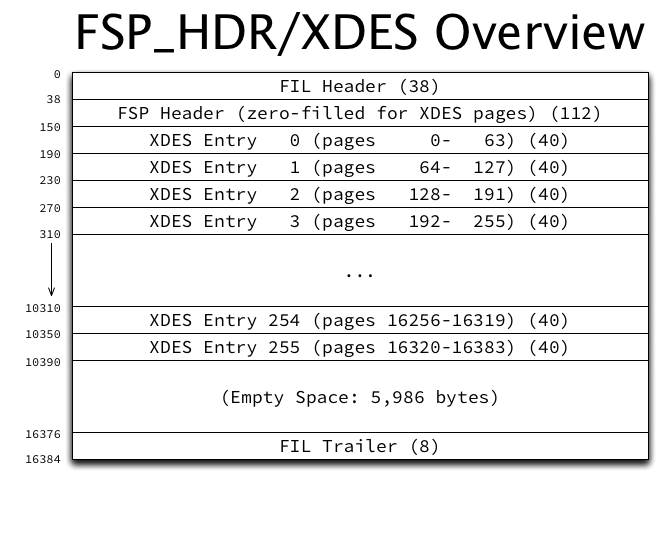
As described previously, InnoDB pages are normally 16 KiB, and are grouped into 1 MiB blocks of 64 contiguous pages, which is called an “extent”. InnoDB allocates FSP_HDR and XDES pages at fixed locations within the space, to keep track of which extents are in use, and which pages within each extent are in use. These pages have a pretty simple structure:

They contain the usual FIL header and trailer, an FSP header (discussed a bit later), and 256 “extent descriptors” or just “descriptors”. They also contain a sizable amount of unused space.

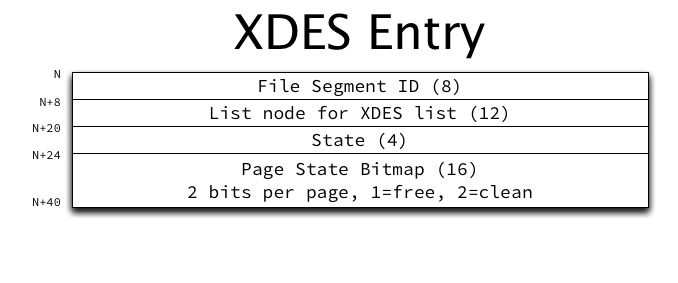
Extent descriptors have the following structure:

The purpose of the various fields in an extent descriptor are:

  • File Segment ID: The ID of the file segment to which the extent belongs, if it belongs to a file segment.
  • List node for XDES list: Pointers to previous and next extents in a doubly-linked extent descriptor list.
  • State: The current state of the extent, for which only four values are currently defined: FREE, FREE_FRAG, and FULL_FRAG, meaning this extent belongs to the space’s list with the same name; and FSEG, meaning this extent belongs to the file segment with the ID stored in the File Segment ID field. (More on these lists below.)
  • Page State Bitmap: A bitmap of 2 bits per page in the extent (64 x 2 = 128 bits, or 16 bytes). The first bit indicates whether the page is free. The second bit is reserved to indicate whether the page is clean (has no un-flushed data), but this bit is currently unused and is always set to 1.

Other structures that reference an extent do so using a combination of the page number of the FSP_HDR or XDES page in which the extent’s descriptor resides, and the byte offset within that page of the descriptor entry itself. For example, the extent referenced by “page 0 offset 150” is the first extent in the space, accounting for pages 0-63, while “page 16384 offset 270” accounts for pages 16576-16639.

List base nodes and list nodes

Lists (or “free lists” as InnoDB calls them) are a fairly generic structure that allows linking multiple related structures together. It consists of two complementary structures, which form a nicely featured on-disk doubly-linked list. The “list base node” has the following structure:

The base node is stored only once in some high level structure (such as the FSP header). It contains the length of the list, and pointers to the first and last list node in the list. The actual “list nodes” look very similar:

Instead of storing first and last pointers, of course, the list node stores previous and next pointers.

All pointers consist of a page number (which is required to be within the same space), and a byte offset within that page where the list node can be found. All pointers point to the beginning (that is, N+0) of the list node, not necessarily of the structure being linked together. For example, when extent descriptor entries are linked in a list, since the list node is at offset 8 within the XDES entry structure, the code reading a list entry must “know” that the descriptor structure starts 8 bytes before the offset of the list node, and read the structure from there. (It would’ve perhaps been a good idea to ensure that the list node is always first in any structure, but that is not the case.)

The file space header and extent lists

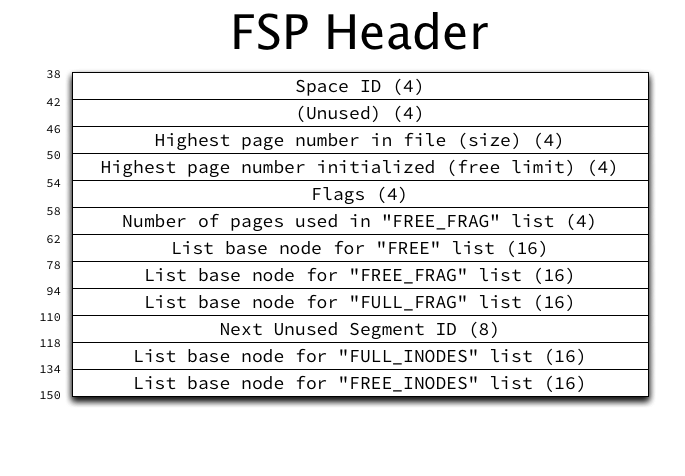
Aside from storing the extent descriptor entries themselves, the FSP_HDR page (which is always page 0 in a space) also stores the FSP header, which contains a lot of lists, so couldn’t easily be described earlier. The structure of the FSP header is as follows:

The purposes of the non-list related fields in an FSP header are (not in order):

  • Space ID: The space ID of the current space.
  • Highest page number in the space (size): The “size” is the highest valid page number, and is incremented when the file is grown. However, not all of these pages are initialized (some may be zero-filled), as extending a space is a multi-step process.
  • Highest page number initialized (free limit): The “free limit” is the highest page number for which the FIL header has been initialized, storing the page number in the page itself, amongst other things. The free limit will always be less than or equal to the size.
  • Flags: Storage of flags related to the space.
  • Next Unused Segment ID: The file segment ID that will be used for the next allocated file segment. (This is essentially an auto-increment integer.)
  • Number of pages used in the FREE_FRAG list: This is stored as an optimization to be able to quickly calculate the number of free pages in the FREE_FRAG list, without iterating through all extents in the list and summing the free pages available in each.

List base nodes for the following extent descriptor lists are also stored in the FSP header:

  • FREE_FRAG: Extents with free pages remaining that are allocated to be used in “fragments”, having individual pages allocated to different purposes rather than allocating the entire extent. For example, every extent with an FSP_HDR or XDES page will be placed on the FREE_FRAG list so that the remaining free pages in the extent can be allocated for other uses.
  • FULL_FRAG: Exactly like FREE_FRAG but for extents with no free pages remaining. Extents are moved from FREE_FRAG to FULL_FRAG when they become full, and moved back to FREE_FRAG if a page is released so that they are no longer full.
  • FREE: Extents that are completely unused and available to be allocated in whole to some purpose. A FREE extent could be allocated to a file segment (and placed on the appropriate INODE list), or moved to the FREE_FRAG list for individual page use.

File segments and inodes

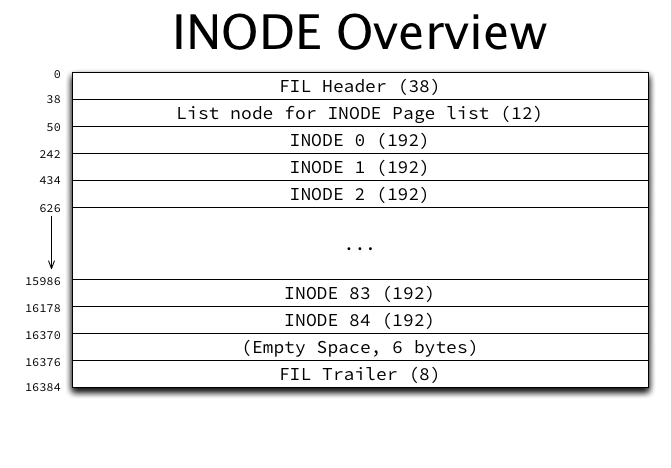
File segments and inodes are perhaps where InnoDB terminology and documentation are murkiest. InnoDB overloads the term “inode”, which is in common use in filesystems, and uses it for both INODE entries (a single small structure) and INODE pages (a page type holding many INODE entries). Ignoring the naming confusion for a moment, an INODE entry in InnoDB merely describes a file segment (frequently called an FSEG), and will be referred to as a “file segment INODE” from now on. The INODE pages that contain them have the following structure:

Each INODE page contains 85 file segment INODE entries (for a 16 KiB page), each of which are 192 bytes. In addition, they contain a list node which is used in the following lists of INODE pages in the FSP_HDR‘s FSP header structure as described above:

  • FREE_INODES: A list of INODE pages which have at least one free file segment INODE entry.
  • FULL_INODES: A list of INODE pages which have zero free file segment INODE entries. When using “file per table” spaces, this list in each per-table space will be empty unless the table has more than 42 indexes, as each index consumes exactly two file segment INODE entries.

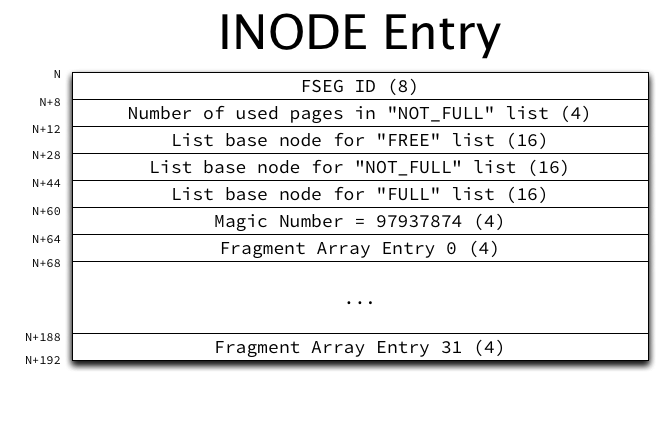
A file segment INODE entry has the following structure:

The purpose of each of the non-list fields in each INODE entry are:

  • File Segment ID: The ID of the file segment (FSEG) described by this file segment INODE entry. If the ID is 0, the entry is unused.
  • Magic Number: The value 97937874 is stored as a marker that this file segment INODE entry has been properly initialized.
  • Number of used pages in the NOT_FULL list: Exactly like the space’s FREE_FRAG list (in the FSP header), this field stores the number of pages used in the NOT_FULL list as an optimization to be able to quickly calculate the number of free pages in the list without iterating through all extents in the list.
  • Fragment Array: An array of 32 page numbers of pages allocated individually from extents in the space’s FREE_FRAG or FULL_FRAG list of “fragment” extents. Once this array becomes full, only full extents can be allocated to the file segment.

As a table grows it will allocate individual pages in each file segment until the fragment array becomes full, and then switch to allocating 1 extent at a time, and eventually to allocating 4 extents at a time.

List base nodes of extent descriptors are also present in each file segment INODE entry:

  • FREE: Extents that are completely unused and are allocated to this file segment.
  • NOT_FULL: Extents with at least one used page allocated to this file segment. When the last free page is used, the extent is moved to the FULL list.
  • FULL: Extents with no free pages allocated to this file segment. If a page becomes free, the extent is moved to the NOT_FULL list.

If the last used page is freed from an extent in the NOT_FULL list, the extent could be moved to the file segment’s FREE list, but in practice is actually moved directly back to the space’s FREE list instead.

How indexes use file segments

Although INDEX pages haven’t been described yet, one small aspect can be looked at now. The root page of each index’s FSEG header contains pointers to the file segment INODE entries which describe the file segments used by the index. Each index uses one file segment for leaf pages and one for non-leaf (internal) pages. This information is stored in the FSEG header structure (in the INDEX page):

The space IDs present are somewhat superfluous — they will always be the same as the current space. The page number and offset point to a file segment INODE entry in an INODE page. Both file segments will always be present, even though they may be completely empty.

For example in a newly created table, the only page that exists will be the root page, which is also a leaf page, but is present in the “internal” file segment (so that it doesn’t have to be moved later). The “leaf” file segment INODE lists and fragment array will all be empty. The “internal” file segment INODE lists will all be empty, and the single root page will be in the fragment array.

Tying it all together

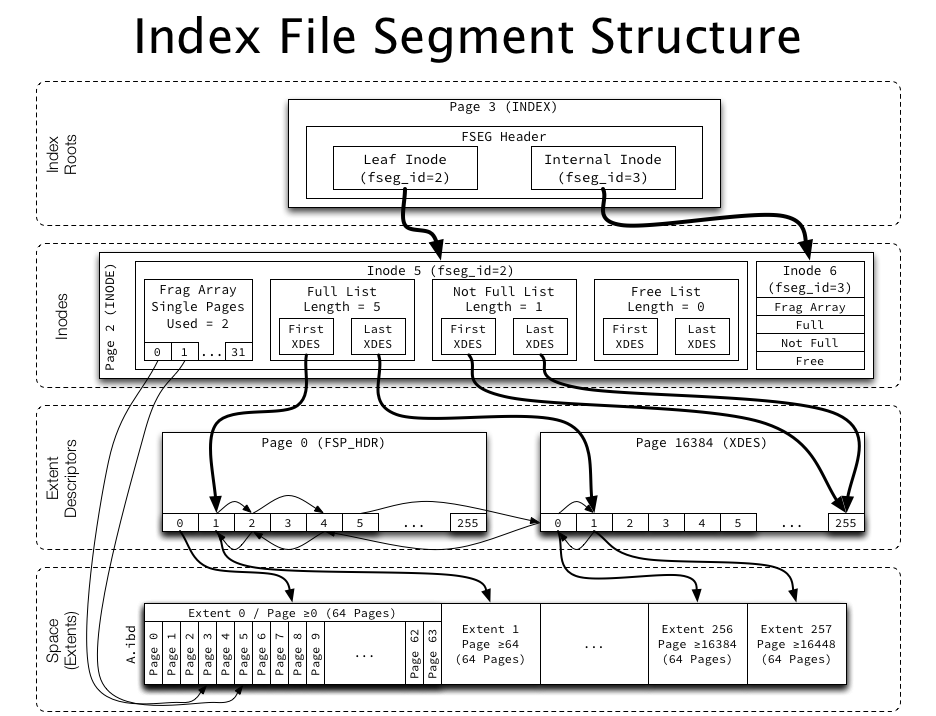
The following diagram attempts to illustrate the entire multi-level structure for an index:

The index root page points to two inodes (file segments), each of which have a fragment array (pointing to up to 32 individual pages from a fragment list), as well as several lists of whole extents, which are linked together using list pointers in the extent descriptors. The extent descriptors are used both to reference an extent as well as to keep track of free pages within an extent. Easy!

What’s next?

Next we’ll look at the structure of one of the most important page types from a user’s perspective, INDEX pages. We’ll then look at how InnoDB structures its indexes at a high level.