Page management in InnoDB space files

In On learning InnoDB: A journey to the core, I introduced the innodb_diagrams project to document the InnoDB internals, which provides the diagrams used in this post. (Note that each image below is linked to a higher resolution version of the same image.)

The basic structure of the space and each page was described in The basics of InnoDB space file layout, so now we’ll expand on that to describe InnoDB’s structures related to management of pages and extents, and “free space” management, and how it tracks pages allocated to the many different purposes for which pages are used.

Extents and extent descriptors

As described previously, InnoDB pages are normally 16 KiB, and are grouped into 1 MiB blocks of 64 contiguous pages, which is called an “extent”. InnoDB allocates FSP_HDR and XDES pages at fixed locations within the space, to keep track of which extents are in use, and which pages within each extent are in use. These pages have a pretty simple structure:
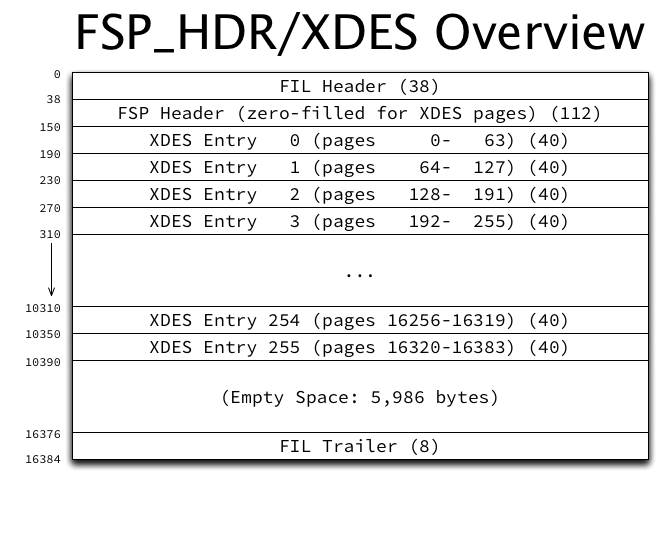
They contain the usual FIL header and trailer, an FSP header (discussed a bit later), and 256 “extent descriptors” or just “descriptors”. They also contain a sizable amount of unused space.

Extent descriptors have the following structure:
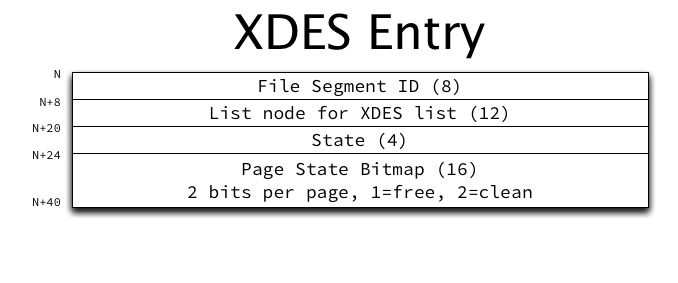
The purpose of the various fields in an extent descriptor are:

  • File Segment ID: The ID of the file segment to which the extent belongs, if it belongs to a file segment.
  • List node for XDES list: Pointers to previous and next extents in a doubly-linked extent descriptor list.
  • State: The current state of the extent, for which only four values are currently defined: FREE, FREE_FRAG, and FULL_FRAG, meaning this extent belongs to the space’s list with the same name; and FSEG, meaning this extent belongs to the file segment with the ID stored in the File Segment ID field. (More on these lists below.)
  • Page State Bitmap: A bitmap of 2 bits per page in the extent (64 x 2 = 128 bits, or 16 bytes). The first bit indicates whether the page is free. The second bit is reserved to indicate whether the page is clean (has no un-flushed data), but this bit is currently unused and is always set to 1.

Other structures that reference an extent do so using a combination of the page number of the FSP_HDR or XDES page in which the extent’s descriptor resides, and the byte offset within that page of the descriptor entry itself. For example, the extent referenced by “page 0 offset 150” is the first extent in the space, accounting for pages 0-63, while “page 16384 offset 270” accounts for pages 16576-16639.

List base nodes and list nodes

Lists (or “free lists” as InnoDB calls them) are a fairly generic structure that allows linking multiple related structures together. It consists of two complementary structures, which form a nicely featured on-disk doubly-linked list. The “list base node” has the following structure:

The base node is stored only once in some high level structure (such as the FSP header). It contains the length of the list, and pointers to the first and last list node in the list. The actual “list nodes” look very similar:

Instead of storing first and last pointers, of course, the list node stores previous and next pointers.

All pointers consist of a page number (which is required to be within the same space), and a byte offset within that page where the list node can be found. All pointers point to the beginning (that is, N+0) of the list node, not necessarily of the structure being linked together. For example, when extent descriptor entries are linked in a list, since the list node is at offset 8 within the XDES entry structure, the code reading a list entry must “know” that the descriptor structure starts 8 bytes before the offset of the list node, and read the structure from there. (It would’ve perhaps been a good idea to ensure that the list node is always first in any structure, but that is not the case.)

The file space header and extent lists

Aside from storing the extent descriptor entries themselves, the FSP_HDR page (which is always page 0 in a space) also stores the FSP header, which contains a lot of lists, so couldn’t easily be described earlier. The structure of the FSP header is as follows:
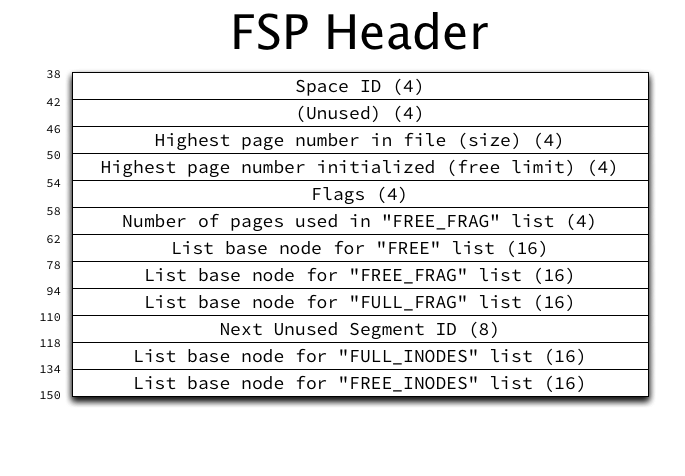
The purposes of the non-list related fields in an FSP header are (not in order):

  • Space ID: The space ID of the current space.
  • Highest page number in the space (size): The “size” is the highest valid page number, and is incremented when the file is grown. However, not all of these pages are initialized (some may be zero-filled), as extending a space is a multi-step process.
  • Highest page number initialized (free limit): The “free limit” is the highest page number for which the FIL header has been initialized, storing the page number in the page itself, amongst other things. The free limit will always be less than or equal to the size.
  • Flags: Storage of flags related to the space.
  • Next Unused Segment ID: The file segment ID that will be used for the next allocated file segment. (This is essentially an auto-increment integer.)
  • Number of pages used in the FREE_FRAG list: This is stored as an optimization to be able to quickly calculate the number of free pages in the FREE_FRAG list, without iterating through all extents in the list and summing the free pages available in each.

List base nodes for the following extent descriptor lists are also stored in the FSP header:

  • FREE_FRAG: Extents with free pages remaining that are allocated to be used in “fragments”, having individual pages allocated to different purposes rather than allocating the entire extent. For example, every extent with an FSP_HDR or XDES page will be placed on the FREE_FRAG list so that the remaining free pages in the extent can be allocated for other uses.
  • FULL_FRAG: Exactly like FREE_FRAG but for extents with no free pages remaining. Extents are moved from FREE_FRAG to FULL_FRAG when they become full, and moved back to FREE_FRAG if a page is released so that they are no longer full.
  • FREE: Extents that are completely unused and available to be allocated in whole to some purpose. A FREE extent could be allocated to a file segment (and placed on the appropriate INODE list), or moved to the FREE_FRAG list for individual page use.

File segments and inodes

File segments and inodes are perhaps where InnoDB terminology and documentation are murkiest. InnoDB overloads the term “inode”, which is in common use in filesystems, and uses it for both INODE entries (a single small structure) and INODE pages (a page type holding many INODE entries). Ignoring the naming confusion for a moment, an INODE entry in InnoDB merely describes a file segment (frequently called an FSEG), and will be referred to as a “file segment INODE” from now on. The INODE pages that contain them have the following structure:
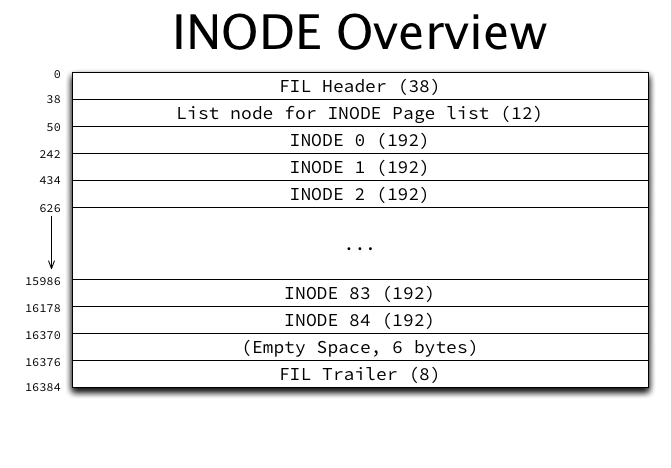
Each INODE page contains 85 file segment INODE entries (for a 16 KiB page), each of which are 192 bytes. In addition, they contain a list node which is used in the following lists of INODE pages in the FSP_HDR‘s FSP header structure as described above:

  • FREE_INODES: A list of INODE pages which have at least one free file segment INODE entry.
  • FULL_INODES: A list of INODE pages which have zero free file segment INODE entries. When using “file per table” spaces, this list in each per-table space will be empty unless the table has more than 42 indexes, as each index consumes exactly two file segment INODE entries.

A file segment INODE entry has the following structure:
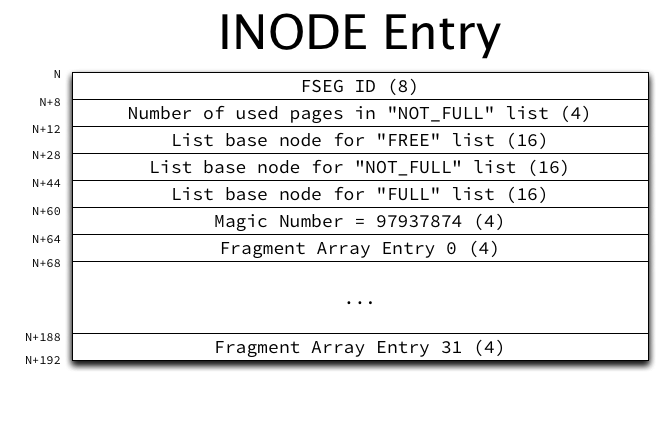
The purpose of each of the non-list fields in each INODE entry are:

  • File Segment ID: The ID of the file segment (FSEG) described by this file segment INODE entry. If the ID is 0, the entry is unused.
  • Magic Number: The value 97937874 is stored as a marker that this file segment INODE entry has been properly initialized.
  • Number of used pages in the NOT_FULL list: Exactly like the space’s FREE_FRAG list (in the FSP header), this field stores the number of pages used in the NOT_FULL list as an optimization to be able to quickly calculate the number of free pages in the list without iterating through all extents in the list.
  • Fragment Array: An array of 32 page numbers of pages allocated individually from extents in the space’s FREE_FRAG or FULL_FRAG list of “fragment” extents. Once this array becomes full, only full extents can be allocated to the file segment.

As a table grows it will allocate individual pages in each file segment until the fragment array becomes full, and then switch to allocating 1 extent at a time, and eventually to allocating 4 extents at a time.

List base nodes of extent descriptors are also present in each file segment INODE entry:

  • FREE: Extents that are completely unused and are allocated to this file segment.
  • NOT_FULL: Extents with at least one used page allocated to this file segment. When the last free page is used, the extent is moved to the FULL list.
  • FULL: Extents with no free pages allocated to this file segment. If a page becomes free, the extent is moved to the NOT_FULL list.

If the last used page is freed from an extent in the NOT_FULL list, the extent could be moved to the file segment’s FREE list, but in practice is actually moved directly back to the space’s FREE list instead.

How indexes use file segments

Although INDEX pages haven’t been described yet, one small aspect can be looked at now. The root page of each index’s FSEG header contains pointers to the file segment INODE entries which describe the file segments used by the index. Each index uses one file segment for leaf pages and one for non-leaf (internal) pages. This information is stored in the FSEG header structure (in the INDEX page):

The space IDs present are somewhat superfluous — they will always be the same as the current space. The page number and offset point to a file segment INODE entry in an INODE page. Both file segments will always be present, even though they may be completely empty.

For example in a newly created table, the only page that exists will be the root page, which is also a leaf page, but is present in the “internal” file segment (so that it doesn’t have to be moved later). The “leaf” file segment INODE lists and fragment array will all be empty. The “internal” file segment INODE lists will all be empty, and the single root page will be in the fragment array.

Tying it all together

The following diagram attempts to illustrate the entire multi-level structure for an index:
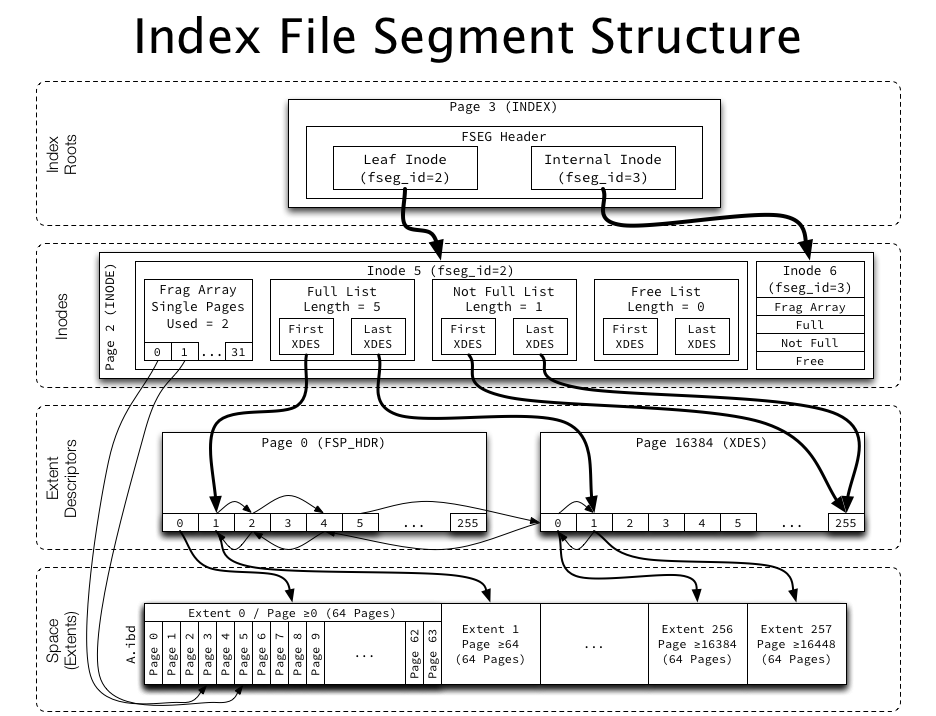
The index root page points to two inodes (file segments), each of which have a fragment array (pointing to up to 32 individual pages from a fragment list), as well as several lists of whole extents, which are linked together using list pointers in the extent descriptors. The extent descriptors are used both to reference an extent as well as to keep track of free pages within an extent. Easy!

What’s next?

Next we’ll look at the structure of one of the most important page types from a user’s perspective, INDEX pages. We’ll then look at how InnoDB structures its indexes at a high level.
The basics of InnoDB space file layout

In On learning InnoDB: A journey to the core, I introduced the innodb_diagrams project to document the InnoDB internals, which provides the diagrams used in this post.

InnoDB’s data storage model uses “spaces”, often called “tablespaces” in the context of MySQL, and sometimes called “file spaces” in InnoDB itself. A space may consist of multiple actual files at the operating system level (e.g. ibdata1, ibdata2, etc.) but it is just a single logical file — multiple physical files are just treated as though they were physically concatenated together.

Each space in InnoDB is assigned a 32-bit integer space ID, which is used in many different places to refer to the space. InnoDB always has a “system space”, which is always assigned the space ID of 0. The system space is used for various special bookkeeping that InnoDB requires. Through MySQL, InnoDB currently only supports additional spaces in the form of “file per table” spaces, which create an .ibd file for each MySQL table. Internally, this .ibd file is actually a fully functional space which could contain multiple tables, but in the implementation with MySQL, they will only contain a single table.

Pages

Each space is divided into pages, normally 16 KiB each (this can differ for two reasons: if the compile-time define UNIV_PAGE_SIZE is changed, or if InnoDB compression is used). Each page within a space is assigned a 32-bit integer page number, often called “offset”, which is actually just the page’s offset from the beginning of the space (not necessarily the file, for multi-file spaces). So, page 0 is located at file offset 0, page 1 at file offset 16384, and so on. (The astute may remember that InnoDB has a limit of 64TiB of data; this is actually a limit per space, and is due primarily to the page number being a 32-bit integer combined with the default page size: 232 x 16 KiB = 64 TiB.)

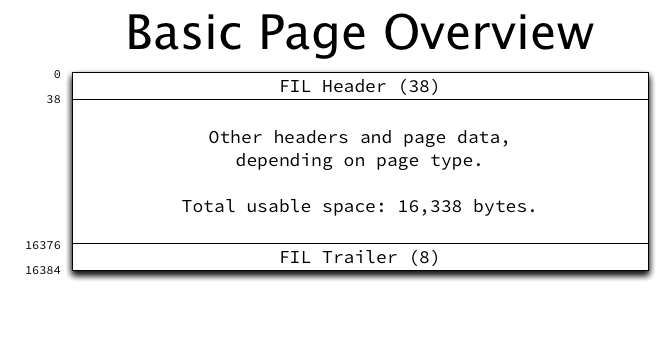
A page is laid out as follows:

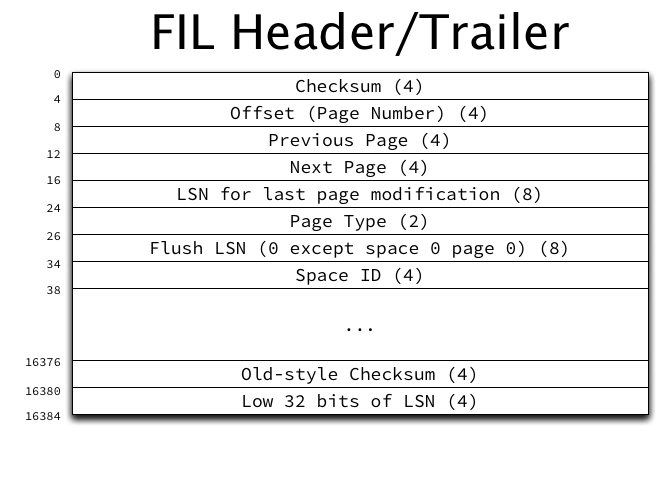
Every page has a 38-byte FIL header and 8-byte FIL trailer (FIL is a shortened form of “file”). The header contains a field which is used to indicate the page type, which determines the structure of the rest of the page. The structure of the FIL header and trailer are:

The FIL header and trailer contain the following structures (not in order):

  • The page type is stored in the header. This is necessary in order to parse the rest of the page data. Pages are allocated for file space management, extent management, the transaction system, the data dictionary, undo logs, blobs, and of course indexes (table data).
  • The space ID is stored in the header.
  • The page number is stored in the header once the page has been initialized. Checking that the page number read from that field matches what it should be based on the offset into the file is helpful to indicate that reading is correct, and this field being initialized indicates that the page has been initialized.
  • A 32-bit checksum is stored in the header, and an older format (and broken) 32-bit checksum is stored in the trailer. The older checksum could be deprecated and that space reclaimed at some point.
  • Pointers to the logical previous and next page for this page type are stored in the header. This allows doubly-linked lists of pages to be built, and this is used for INDEX pages to link all pages at the same level, which allows for e.g. full index scans to be efficient. Many page types do not use these fields.
  • The 64-bit log sequence number (LSN) of the last modification of the page is stored in the header, and the low 32-bits of the same LSN are stored in the trailer.
  • A 64-bit “flush LSN” field is stored in the header, which is actually only populated for a single page in the entire system, page 0 of space 0. This stores the highest LSN flushed to any page in the entire system (all spaces). This field is a great candidate for re-use in the rest of the space.

Space files

A space file is just a concatenation of many (up to 232) pages. For more efficient management, pages are grouped into blocks of 1 MiB (64 contiguous pages with the default page size of 16 KiB), and called an “extent”. Many structures then refer only to extents to allocate pages within a space.

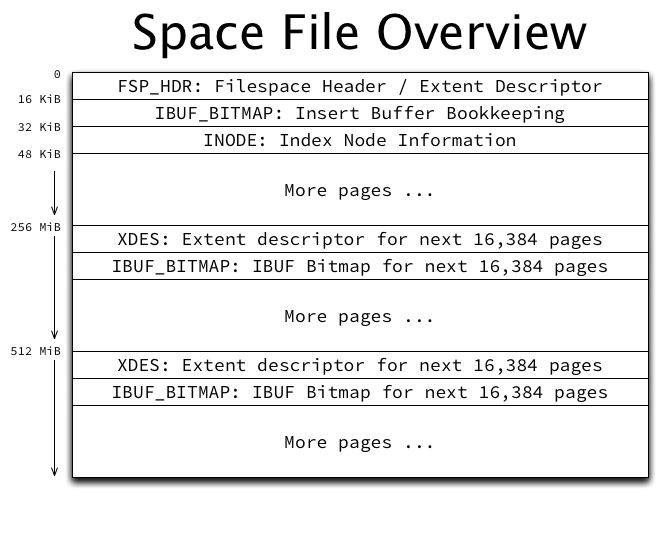
InnoDB needs to do some bookkeeping to keep track of all of the pages, extents, and the space itself, so a space file has some mandatory super-structure:

The first page (page 0) in a space is always an FSP_HDR or “file space header” page. The FSP_HDR page contains (confusingly) an FSP header structure, which tracks things like the size of the space and lists of free, fragmented, and full extents. (A more detailed discussion of free space management is reserved for a future post.)

An FSP_HDR page only has enough space internally to store bookkeeping information for 256 extents (or 16,384 pages, 256 MiB), so additional space must be reserved every 16,384 pages for bookkeeping information in the form of an XDES page. The structure of XDES and FSP_HDR pages is identical, except that the FSP header structure is zeroed-out in XDES pages. These additional pages are allocated automatically as a space file grows.

The third page in each space (page 2) will be an INODE page, which is used to store lists related to file segments (groupings of extents plus an array of singly-allocated “fragment” pages). Each INODE page can store 85 INODE entries, and each index requires two INODE entries. (A more detailed discussion of INODE entries and file segments is reserved for a future post.)

Alongside each FSP_HDR or XDES page will also be an IBUF_BITMAP page, which is used for bookkeeping information related to insert buffering, and is outside the scope of this post.

The system space

The system space (space 0) is special in InnoDB, and contains quite a few pages allocated at fixed page numbers to store a wide range of information critical to InnoDB’s operation. Since the system space is a space like any other, it has the required FSP_HDR, IBUF_BITMAP, and INODE pages allocated as its first three pages. After that, it is a bit special:

The following pages are allocated:

  • Page 3, type SYS: Headers and bookkeeping information related to insert buffering.
  • Page 4, type INDEX: The root page of the index structure used for insert buffering.
  • Page 5, type TRX_SYS: Information related to the operation of InnoDB’s transaction system, such as the latest transaction ID, MySQL binary log information, and the location of the double write buffer extents.
  • Page 6, type SYS: The first rollback segment page. Additional pages (or whole extents) are allocated as needed to store rollback segment data.
  • Page 7, type SYS: Headers related to the data dictionary, containing root page numbers for the indexes that make up the data dictionary. This information is required to be able to find any other indexes (tables), as their root page numbers are stored in the data dictionary itself.
  • Pages 64-127: The first block of 64 pages (an extent) in the double write buffer. The double write buffer is used as part of InnoDB’s recovery mechanism.
  • Pages 128-191: The second block of the double write buffer.

All other pages are allocated on an as-needed basis to indexes, rollback segments, undo logs, etc.

Per-table space files

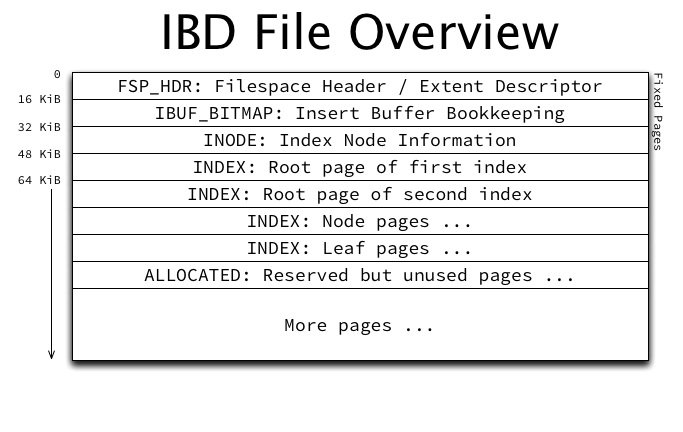
InnoDB offers a “file per table” mode, which will create a file (which as explained above is actually a space) for each MySQL table created. A better name for this feature may be “space per table” rather than “file per table”. The .ibd file created for each table has the typical space file structure:

Ignoring “fast index creation” which adds indexes at runtime, after the requisite 3 initial pages, the next pages allocated in the space will be the root pages of each index in the table, in the order they were defined in the table creation. Page 3 will be the root of the clustered index, Page 4 will be the root of the first secondary key, etc.

Since most of InnoDB’s bookkeeping structures are stored in the system space, most pages allocated in a per-table space will be of type INDEX and store table data.

What’s next?

Next we’ll look at free space management within InnoDB: extent descriptors, file segments (inodes), and lists.

A quick introduction to innodb_ruby

[This post refers to innodb_ruby version 0.8.8 as of February 3, 2014.]

In On learning InnoDB: A journey to the core I introduced a new library and command-line tool in the innodb_ruby project. Now I’ll show off a few of the things it can do. I won’t try to explain all of the InnoDB structures exposed, since that will get the demos here way off track. We’ll come back to those structures later on!

Installing innodb_ruby

If you’re familiar with Ruby and gems (or you just happen to have a well-configured Ruby installation), I regularly push innodb_ruby gems to RubyGems, so you should only need to:

gem install innodb_ruby

If that doesn’t work, you might want to check out The RubyGems manual to try and get your installation working. Or abandon all hope. :-D

When you have a working installation, you should have an innodb_space command in your path:

$ innodb_space 
Error: File must be provided with -f argument

Usage: innodb_space -f <file> [-p <page>] [-l <level>] <mode> [<mode>, ...]

Generating some data

For these examples, I need more than a few rows to exist in order to properly examine different data structures. Make sure you’re running a new enough server (MySQL 5.5 is good) with Barrracuda tables and that you have innodb_file_per_table enabled. Create and populate a very simple table with a small bit of Ruby:

#!/usr/bin/env ruby

require "mysql"

m = Mysql.new("127.0.0.1", "root", "", "test")

m.query("DROP TABLE IF EXISTS t")

m.query("CREATE TABLE t (i INT UNSIGNED NOT NULL, PRIMARY KEY(i)) ENGINE=InnoDB")

(1..1000000).to_a.shuffle.each_with_index do |i, index|
  m.query("INSERT INTO t (i) VALUES (#{i})")
  puts "Inserted #{index} rows..." if index % 10000 == 0
end

This should generate a table of 1 million rows (inserted in random order to make things more interesting), of about 48MiB, or 3,071 16KiB pages.

(Note that if you’re trying this at home, you’ll want to watch SHOW GLOBAL STATUS LIKE 'Innodb_buffer_pool_pages_dirty' to wait for all dirty pages to be flushed before proceeding, since the tools below will be accessing the tablespace file on disk, with no coordination with a running InnoDB instance.)

Examining a tablespace file

One of the most high-level overviews possible with innodb_space is space-page-type-regions, which prints one line per contiguous block of a given page type:

$ innodb_space -f test/t.ibd space-page-type-regions
start       end         count       type                
0           0           1           FSP_HDR             
1           1           1           IBUF_BITMAP         
2           2           1           INODE               
3           37          35          INDEX               
38          63          26          FREE (ALLOCATED)    
64          2188        2125        INDEX               
2189        2239        51          FREE (ALLOCATED)    
2240        2240        1           INDEX               
2241        2303        63          FREE (ALLOCATED)    
2304        2304        1           INDEX               
2305        2367        63          FREE (ALLOCATED)    
2368        2368        1           INDEX               
2369        2431        63          FREE (ALLOCATED)    
2432        2432        1           INDEX               
2433        2495        63          FREE (ALLOCATED)    
2496        2496        1           INDEX               
2497        2687        191         FREE (ALLOCATED)    

Without getting into too many of the InnoDB internal implementation details, you see some of InnoDB’s bookkeeping structures (FSP_HDR, IBUF_BITMAP, and INODE pages), actual table data (INDEX pages), and free space (FREE (ALLOCATED) pages).

A listing of space consumed, in pages, by each index (actually each “file segment”, or FSEG for each index) can be fairly interesting as well:

$ innodb_space -f test/t.ibd space-indexes
id          root        fseg        used        allocated   fill_factor 
15          3           internal    3           3           100.00%     
15          3           leaf        2162        2528        85.52%      

Every index has an “internal” file segment, used for non-leaf pages, and a “leaf” file segment, used for leaf pages. Pages may be allocated to a file segment but currently unused (type FREE (ALLOCATED)), so “fill_factor” will show the ratio of used to unused. (Keep in mind this has no relation to how full the index pages are, that is another matter.)

Examining a single page

The page-dump mode dumps everything it knows about a single page. It currently leans heavily on the typical Ruby pretty-printer module pp to print the structures — that would be a great thing to clean up in the future. The innodb_ruby library initially parses pages using a minimal Innodb::Page class, and then using the type field present in the common header optionally hands off the different page types to specialized classes (such as Innodb::Page::Index for type INDEX) for further parsing.

A good page to start looking would be the first INDEX page, which is the root node of the index tree for the test table created above, and is located at page 3:

$ innodb_space -f test/t.ibd -p 3 page-dump

The initial line will tell you which class is handling this page:

#<Innodb::Page::Index:0x007fe304855360>:

The FIL header is printed next:

fil header:
{:checksum=>621772966,
 :offset=>3,
 :prev=>nil,
 :next=>nil,
 :lsn=>102947976,
 :type=>:INDEX,
 :flush_lsn=>0,
 :space_id=>1}

The FIL header (and footer) is common to all page types and contains primarily information about the page itself.

Additional information follows depending on the page type; for INDEX pages the following information is dumped:

  • the “page header”, information about the index page
  • the “fseg header”, information related to space management for the file segments (groups of extents) used by this index
  • a summary of sizes (in bytes) of different parts of the page: free space, data space, record size, etc.
  • the system records, infimum and supremum
  • the contents of the page directory, which is used to make record searches more efficient
  • the user records, the actual data stored by the user (the fields of which will not be parsed unless a record “describer” has been loaded)

Looking at index space consumption

It’s possible to see some of the most useful space-consumption related data for all index pages by using the space-index-pages-summary mode:

$ innodb_space -f test/t.ibd space-index-pages-summary | head -n 10
page        index   level   data    free    records 
3           15      2       26      16226   2       
4           15      0       9812    6286    446     
5           15      0       15158   860     689     
6           15      0       10912   5170    496     
7           15      0       10670   5412    485     
8           15      0       12980   3066    590     
9           15      0       11264   4808    512     
10          15      0       4488    11690   204     
11          15      0       9680    6418    440     

This allows you to see the amount of data and free space, and a record count for the table with a minimal fuss.

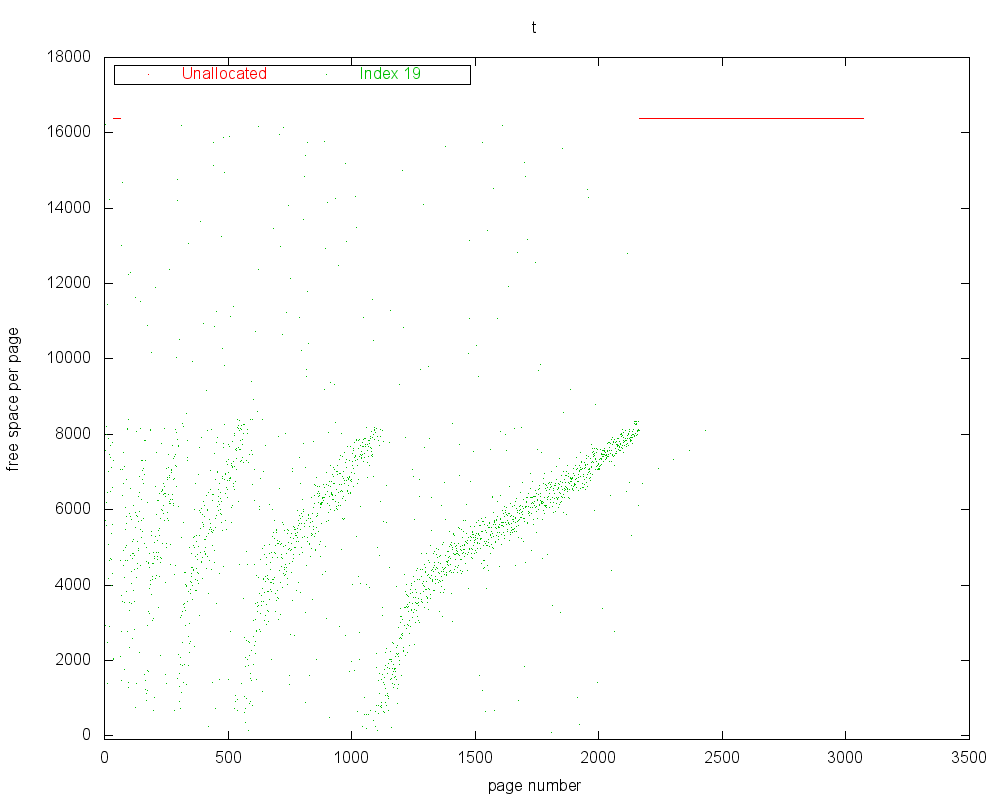
If a working gnuplot is present and the Ruby gnuplot gem is installed, it’s also very easy to make an useful (although not very pretty) scatter plot of this information:

$ innodb_space -f test/t.ibd space-index-pages-free-plot
Wrote t_free.png

The plots produced by space-index-pages-free-plot look like:


Free Space Plot – The Y axis indicates the amount of free space in each page, while the X axis is the page number, and represents file offset as well. Click for a full-size version.

Making sense of row data

In order to be really useful at examining real tables, innodb_ruby needs to be provided with some way to understand the table schema. This is done in the form of a “describer” class which can be loaded dynamically. This is one aspect of the innodb_ruby library that is not terribly well documented (or well designed, yet). A simple describer class for the above table (i INT UNSIGNED NOT NULL, PRIMARY KEY (i) and no other columns or indexes) would look like:

class SimpleTDescriber < Innodb::RecordDescriber
  type :clustered
  key "i", :INT, :UNSIGNED, :NOT_NULL
end

If this class is saved in a file simple_t_describer.rb, it can be loaded (require‘ed) in innodb_space with -r <file> and enabled with -d <class> arguments:

$ innodb_space -f test/t.ibd -r /path/to/simple_t_describer.rb -d SimpleTDescriber <mode>

Having a working record describer loaded does primarily two things:

  • Enable record parsing and dumping in page-dump mode. This will cause :key and :row keys to be populated in the records dumped, as well as make the transaction ID and roll pointer keys available (they are stored in-between the key and non-key fields, so are not reachable without knowing how to parse at least the key fields).
  • Allow use of all index recursion functions, including the index-recurse mode. The ability to parse records is required in order to parse InnoDB’s internal B+tree “node pointer records” which link the B+tree pages together.

Some sample page dumps with full records printed are available: test_t_page_3_page_dump.txt (the index root page) and test_t_page_4_page_dump.txt (an index leaf page).

Recursing an index

Once a record describer is available, indexes can be recursed using index-recurse:

$ innodb_space -f test/t.ibd -r /path/to/simple_t_describer.rb -d SimpleTDescriber -p 3 index-recurse
ROOT NODE #3: 2 records, 26 bytes
  NODE POINTER RECORD >= (i=252) -> #36
  INTERNAL NODE #36: 1117 records, 14521 bytes
    NODE POINTER RECORD >= (i=252) -> #4
    LEAF NODE #4: 446 records, 9812 bytes
      RECORD: (i=1) -> ()
      RECORD: (i=2) -> ()
      RECORD: (i=3) -> ()
      RECORD: (i=4) -> ()
      RECORD: (i=5) -> ()

This will actually walk the B+tree in ascending order (basically a full-table scan) while printing out some information about each node (page) encountered and dumping user records on leaf pages. A larger sample (10k lines) of its output is available here: test_t_page_3_index_recurse.txt.

More to come in the future

I hope this has been a useful first introduction. There is a lot more to come in the future. Patches, comments, and advice are very welcome!

Update 1: Davi pointed out several typos and errors which have been corrected. ;) Make sure you’re using the newest code from examples above.

On learning InnoDB: A journey to the core

I’ve been using InnoDB for about a decade now, and up to now have understood it well enough to make it do what I wanted, most of the time. However in order to achieve some goals related to efficiency, I’ve found it necessary to take my understanding to the next level. Unfortunately, the InnoDB documentation was pretty lacking in clear explanations of InnoDB’s internal data structures. Reading the code turned out to be the only way to find the information I needed.

However I quickly found that the structures and their usage (and especially their inter-relationships) are way too complex to keep in your head just based on reading the code. Additionally it’s only really possible to hope you’ve understood the structure correctly just based on reading (and for me, there were a lot of misunderstandings along the way).

An approach I’ve long taken to understanding something that is complex and poorly documented is the following three steps:

  1. Read the existing documentation and the existing code, until a basic understanding is reached. Often there are serious misunderstandings or incorrect factorization at this step.
  2. Write my own implementation, even a very basic and broken one, preferably in a completely different language (which avoids the tendency to cut and paste anything). Revise my understanding based on what works and what doesn’t.
  3. Create new documentation and diagrams based on my new understanding. Refactor my implementation as necessary (the act of reviewing everything in order to document it often reveals incorrect factorizations). Correct documentation based on new understanding from refactoring code. Repeat until correct.

Implementing InnoDB’s on-disk data structures

I started the innodb_ruby project to implement InnoDB’s on-disk data structures in Ruby. I chose Ruby because it’s very flexible, extremely fast for prototyping, and it’s my current favorite language. Any language would do, however, and performance is not really an issue (although we don’t want it to be too atrociously slow as that will make testing iteratively annoying).

Once starting the project, I had very basic parsing of the FIL header (common to all page types in InnoDB) on 16KiB pages working within minutes. After a couple more hours I had implemented the INDEX page header and could answer very basic questions like how many records were in each index page—an immediately useful result.

I went ahead and implemented each of the other critical data structures that I needed one at a time and in the order I needed each of them to be able to go deeper into each level of understanding InnoDB’s storage. Davi also jumped in and wrote some of the hairy bits such as dealing with variable-width field types in records.

We now have a basically working read-only implementation of InnoDB’s major data structures.

Documenting InnoDB’s on-disk data structures

Once enough of InnoDB’s secrets had been uncovered that I felt I could start making diagrams without them being completely wrong, I set out to build clear and approachable diagrams for all major InnoDB on-disk data structures. I started the innodb_diagrams project, and I chose to build them in OmniGraffle.

At this point most of the on-disk storage format for tablespace files (ibdataX and *.ibd files) is documented for Barracuda format tables (with COMPACT records). Much still remains to build corresponding documents for Antelope format (with REDUNDANT records) and for InnoDB-compressed tables. The log file format also remains.

Making use of the code and diagrams

Now that we have working code that is useful for interactive demos, and diagrams which will make great supporting material, I intend to write a few posts about some of the more interesting and undocumented structures. Keep an eye out!

A brief update on NUMA and MySQL

Some time ago, I wrote a rather popular post The MySQL “swap insanity” problem and the effects of the NUMA architecture (if you haven’t read it, stop now and do that!), which described using numactl --interleave=all to balance memory allocation across nodes in a NUMA system.

I should’ve titled it differently

In reality, the problem posed by uneven allocation across nodes under NUMA is not entirely a swapping problem. I titled the previous post as it was and explained it in the way it was explained largely to address a specific problem seen in the MySQL community. However, the problem described actually has very little to do with swap itself. The problem is really related to Linux’s behavior under memory pressure, and specifically the pressure imposed by running a single NUMA node (and especially node 0) completely out of memory.

When swap is disabled completely, problems are still encountered, usually in the form of extremely slow performance and failed memory allocations.

A more thorough solution

The original post also only addressed only one part of the solution: using interleaved allocation. A complete and reliable solution actually requires three things, as we found when implementing this change for production systems at Twitter:

  1. Forcing interleaved allocation with numactl --interleave=all. This is exactly as described previously, and works well.
  2. Flushing Linux’s buffer caches just before mysqld startup with sysctl -q -w vm.drop_caches=3. This helps to ensure allocation fairness, even if the daemon is restarted while significant amounts of data are in the operating system buffer cache.
  3. Forcing the OS to allocate InnoDB’s buffer pool immediately upon startup, using MAP_POPULATE where supported (Linux 2.6.23+), and falling back to memset otherwise. This forces the NUMA node allocation decisions to be made immediately, while the buffer cache is still clean from the above flush.

These changes are implemented in Twitter MySQL 5.5 as the mysqld_safe options numa-interleave and flush-caches, and mysqld option innodb_buffer_pool_populate, respectively.

The results

On a production machine with 144GB of RAM and a 120GB InnoDB buffer pool, all used memory has been allocated within 152 pages (0.00045%) of perfectly balanced across both NUMA nodes:

N0        :     16870335 ( 64.36 GB)
N1        :     16870183 ( 64.35 GB)
active    :           81 (  0.00 GB)
anon      :     33739094 (128.70 GB)
dirty     :     33739094 (128.70 GB)
mapmax    :          221 (  0.00 GB)
mapped    :         1467 (  0.01 GB)

The buffer pool itself was allocated within 4 pages of balanced (line-wrapped for clarity):

2aaaab2db000 interleave=0-1 anon=33358486 dirty=33358486
  N0=16679245 N1=16679241

Much more importantly, these systems have been extremely stable and have not experienced the “random” stalls under heavy load that we had seen before.